Mixing Headroom for Mastering
Before you submit your mixes for mastering, it is important to make sure you leave enough headroom for the mastering engineer.
Master Peak Level
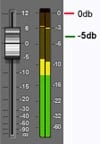 Most mastering engineers recommend having the loudest part of a mix at –5 dB from absolute ‘0’ dBFS. This means you should have the loudest section of the mix 5 dB lower before the peak level of ‘0’.
It is recommended to not go over ‘0’ dBFS on the master fader or individual tracks in the mix. You could have your mix on the master fader within the -5 dB standard, but have individual tracks peaking in the red and possibly leading to distortion. Mastering will not fix this issue and has to be addressed during the mixing process.
Dynamic Range
Example of Dynamic Range
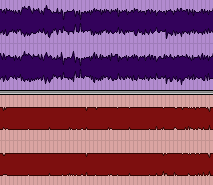
GOOD: The purple waveform has a good dynamic range and is acceptable for mastering.
BAD: The red waveform looks like a cube and has had brick-wall limiting applied on the master. In this example, this mix would not be ideal for mastering.
Don’t over-compress a mix. Leave final overall limiting and compression to the mastering engineer.
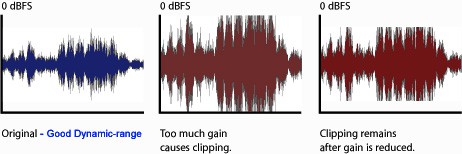
One of the most important things to remember while mixing is dynamic range. You want to leave at least 3db to 4db of dynamic range from the lowest part of the mix to the loudest part. This also depends on the type of genre that is being mixed. You can see the dynamic range of a mix by looking at the printed mix waveform in your audio editing program or master fader metering.
File Formats & Settings
Send your stereo mix and/or drums, instruments and vocal stems. We accept .wav and .aiff file formats. The bit rate must be at least 16bit 44.1K (Audio CD Format) or at the current bit rate your session is at . It is recommended that you use the highest bit rate possible. We do not accept mp3 format for mastering.
Client Project Progress Dashboard

The TravSonic Project Dashboard is a web-based client interface. Receive real-time progress updates on every task and phase our production team executes for your project, keeping you fully informed from start to finish. All on an organized dashboard. Learn More